

You can carry only a limited number of items – you’re not a walking treasury. Instead of hoarding everything on your back, in Tangaria you can build a house and store your items there. You can also use a free storage house, though its capacity depends on your CHR stat, and you can’t sell items from it. While large houses may seem pricey for low-level characters, a small one is actually quite affordable — and here’s the best part: even if your character dies, the house stays. You’ll lose all your items (including those stored inside), but the house itself remains and can be used by your future heroes.
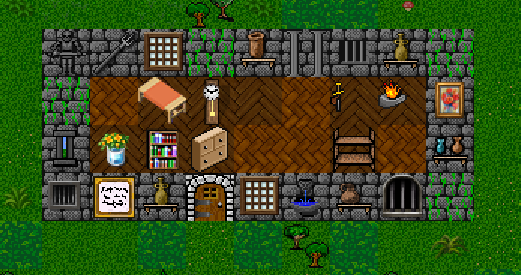
Minimum requirements to build a house
- Your character must be at least level 8
- You must have at least 10 account points
- You need around 10,000 gold for the smallest house:
- 1,200 gold for a Scroll of Cabin Creation
- ~9,000 gold will be auto-deducted during construction (30 account points let you build the smallest house for free – just pay for the Scroll).
Step-by-step: Building a House
- Purchase the scroll: Visit the Mayor in a town and buy a “Scroll of Cabin Creation” for 1,200 gold. You’ll also need around 9,000 gold to finish the construction.
- Gather House Foundation stones: Mine any mountain area to collect them. Tips:
- Mining inside dungeons uses much less nourishment than mining outdoors.
- You’ll need 9 house foundation stones to build a 3×3 house.
- Choose a suitable location:
– Don’t block NPC stores, roads, travel paths, dungeon entrances, or other players’ doors.
– Don’t build in town center, near map borders, atmosphere-damaging areas.
– A good spot for new players is at (-1, 1) — ask in Discord if you’re not sure.
– The ground must be clear of trees (you can chop them), creatures, and other players’ items. Passable terrain like grass, flowers, and bushes is fine. - Create the foundation: Drop the house foundation stones at your chosen location in a 3×3 pattern. The center tile will become your house floor.
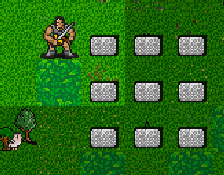
- Stand on any of the foundation stones.
IMPORTANT: If you step on a foundation stone while carrying another one, you’ll automatically pick it up. If that happens, just drop it again to complete the layout. - Activate the scroll: Press
rto read the Scroll of Cabin Creation from your inventory – your house will be built automatically. - Add a door: After your house appears, press
Tand then choose a direction to place the door on an adjacent tile. - Congratulations! You’ve built your first house. Only the owner can open the door. You can now drop items on the floor inside – they’ll stay there safely. Just remember to close the door, or someone might sneak in and steal your stuff. Doors stay open until someone closes them – so be sure to shut it behind you when you go in or out!
Housing Q&A
Where can I build a house?
You can build a house only in Farfest town (0, 1) or in its rural areas to the west (-1, 1).
How to buy (not build) a house? If you find an empty house, you can buy it. Bumping into the door of an unowned house will show its price. To purchase it, press Shift+H (or /house) and point toward the door. Make sure you have enough account points – they’re required to buy any house.
How to build bigger houses?
Visit the Mayor in a town and examine the available house creation scrolls – their descriptions will tell you how many floor tiles each scroll can create. For example, a Scroll of Cabin Creation allows you to build a house with up to 3 floor tiles.
To build a bigger house, you’ll need more account points. A basic 1-tile house requires 10 account points, 2 tiles need 25, and 3 tiles require 50. Check the Account Score guide for the full breakdown.
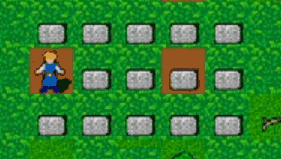
Here’s an example layout for a 3-tile house:
🏡How to customize my house? (paint the door)
Use a potion by throwing it (v) at your house door – the door’s appearance will change to match the potion’s color. Note: some potions reset the door to the default style (“torch”).
🏘️I have two houses and can’t buy more. What should I do?
There’s a 2-house limit for the following reasons:
1. To prevent players from owning all the large houses.
2. To keep things fair in no-wilderness mode, where your home is only in town.
This system encourages progression: start with a small house, upgrade to a bigger one later, and eventually – when you reach end-game – buy a second large house.
🏪How to put an item for sale in your house:
Other players can buy items from your house if you inscribe them with a price using 'for sale <price>' or ~<price>. For example, ~500 will list the item for sale at 500 gold.
To check the listed prices (note: a tax is applied, so final prices may differ, and some items can’t be sold):
– Close your house door while inside.
– Press Shift+H and point at the door – it will display all items currently for sale with their prices.
I’m not receiving gold from item sales in my store – why?
To trade properly from your house, make sure there is at least one empty tile on the floor for the gold to appear. When someone buys an item from you, the payment is placed on that free spot. If there’s already money on that tile, the new gold will be added to it — no need to clear it manually. However, if all tiles are occupied, you won’t receive any gold for the sale. So always keep at least one spot open!
One floor tile can hold up to 10 items. So you can safely display 9 items for sale and leave one slot for the gold — that’s enough.
My house takes up 2 tiles and has items for sale. Do I need to leave a free slot for gold on each tile, or is one free spot enough for the whole house?
One free slot for gold is enough for the whole house, even if it spans multiple tiles.
🧺Some weapons and armor can’t be put up for sale until I wear and remove them — why?
This is not a bug. Wearable items aren’t fully identified until you’ve equipped them at least once. This behavior is intentional.
What’s the deal with the free house at 30-50-70 account points?
Since your ancestors contributed greatly to the town, the mayor offers you the opportunity to build a house at no extra cost. This applies only to the smallest houses (Cabin Deed) and only if you have one house*. With 30 points, you can build a house of 1 tile for free; with 50 points — 2 tiles; with 70 points — 3 tiles.
*You can use the free house construction as many times as you like, but your character may only have two houses at a time. If you want to “reroll” your house (for example, to choose a different appearance), simply sell your current house and build a new one. Keep in mind that a sold house will disappear when day turns to night (or vice versa) if no one is present in the town at that moment.
How do I sell my house (I want to build a new one)?
To sell your house, go outside and use the H command on the door. Note: The empty house will disappear from the location when you leave it (at dawn), so be careful!
If you sell your house while under the effect of Heroism (after drinking a potion of Heroism), the house will be demolished immediately. This can be useful if you’re planning to rebuild and don’t want to wait until dawn.
Why do I see the message: “In Deeptown, you can build houses only east of the dungeon”?
Because in the Deeptown area, building is forbidden to the west of the town (starting from the western wall of the provisioner shop). Just build a bit further east — there is plenty of space. There is a ~ map where you can’t build houses:

🏚️How to enlarge your house:
This feature is temporarily disabled. We’re working on restoring it.
If you’ve run out of space, you can expand your house using the enlarge feature. To do this, dig in mountain areas to collect House Foundation Stones, then use a scroll of house creation to add new space. Here’s how it works:
– Make sure your house isn’t too close to other features (like roads, doors, or other buildings).
– Choose one of your house’s walls and place a 3×N rectangle of foundation stones next to it (at least 3 tiles in height or width).
– Stand on one of the stones and read the scroll – it will convert the stones into floor tiles, extending your house in that direction.
🚫 You cannot enlarge houses that belong to other players.